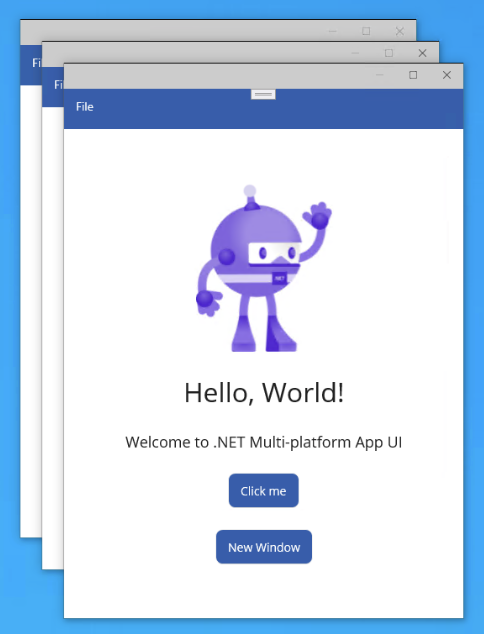
とりいそぎメインウィンドウ(AppShell)の呼び出しだけですが、マルチウィンドウとして複数開けたのでメモ。他のウィンドウの作り方や変数の渡し方などは別途調べる必要あり。
■ MainPage.xaml.cs
namespace MauiApp;


public partial class MainPage : ContentPage
{
	public MainPage()
	{
		InitializeComponent();
	}

.
.
.
    private void OnNewWindowClicked(object sender, EventArgs e)
    {
        // ウィンドウを開く
        Window secondWindow = new Window(new AppShell());
        Application.Current.OpenWindow(secondWindow);
    }
}
■ MainPage.xaml
<?xml version="1.0" encoding="utf-8" ?>

<ContentPage xmlns="http://schemas.microsoft.com/dotnet/2021/maui"

             xmlns:x="http://schemas.microsoft.com/winfx/2009/xaml"

             x:Class="MauiApp.MainPage">

    <ScrollView>

        <VerticalStackLayout

            Spacing="25"

            Padding="30,0"

            VerticalOptions="Center">

・
・
・

            <Button

                x:Name="NewWindowBtn"

                Text="New Window"

                SemanticProperties.Hint="Open the new window"

                Clicked="OnNewWindowClicked"

                HorizontalOptions="Center" />

        </VerticalStackLayout>

    </ScrollView>

</ContentPage>
開発環境:Visual Studio 2022 Community バージョン17.3
プロジェクトテンプレート:.NET MAUI アプリ
自分用覚書です。動かなかったらごめんなさい。